Customizable User Dashboards
To organize build information more efficiently, dashboards can be created by adding desired gadgets to desired layout. Dashboards can be shared with groups or users so that different dashboards can be used for different roles.
Select layout and add gadgets to organize build information
Different dashboard layout can be selected for efficient screen space usage. And gadgets of all kinds of build information are available for adding to the dashboard. You may create multiple dashboards and QuickBuild will display the most recently used dashboard for next login and allow you to switch between your dashboards.

Edit and copy existing dashboard
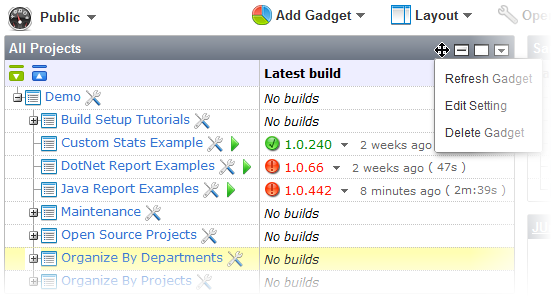
Gadgets on the dashboard can be dragged and dropped to change position, can be maximized/minimized/refreshed/deleted, and their settings can be edited. You may also create new dashboard by copying an existing dashboard.
Share dashboard with groups or specified users
If authorized, dashboard can be shared with groups to create group dashboard. For instance, you may create a develop dashboard for all developers and a test dashboard for all testers. This makes it possible that different roles in the system access different information quickly and efficiently. Dashboards can also be shared with arbitrary users if necessary.

Public dashboard for anonymous users
Public dashboard can be created for anonymous users by sharing a dashboard to the anonymous group.